Building AI-powered workflows
You will learn how AI workflow steps differ from standard automation, which actions are available, and how to chain a first workflow that turns real team input into drafts and posts you control.
Workflows already save teams from repeating the same clicks. AI workflows go one step further by turning messy human input into structured drafts you can edit, approve, or discard. Think of them as automation with reading comprehension: the workflow still follows your triggers, but one node can summarize, classify, or write on demand.
This guide compares regular and AI workflows, lists the kinds of AI actions you will see, and outlines a safe first project you can ship in an afternoon.
Regular workflows versus AI steps
A standard workflow might say when a form arrives, post a fixed thank you and notify a channel. That is deterministic and easy to audit. An AI workflow might say when a form arrives, summarize the request, extract urgency, draft a reply for the assignee, then wait for a human to send it.
The tradeoff is speed versus oversight. AI steps reduce manual rewriting but introduce variability. You will want test data, clear prompts, and usually a staging channel before you point anything at customers.
Common AI powered actions
Dailybot groups model steps into actions that match how teams actually work. Names may vary slightly by workspace version, but you will generally see families like these:
- Summarize turns long answers into short briefs with optional tone or length hints
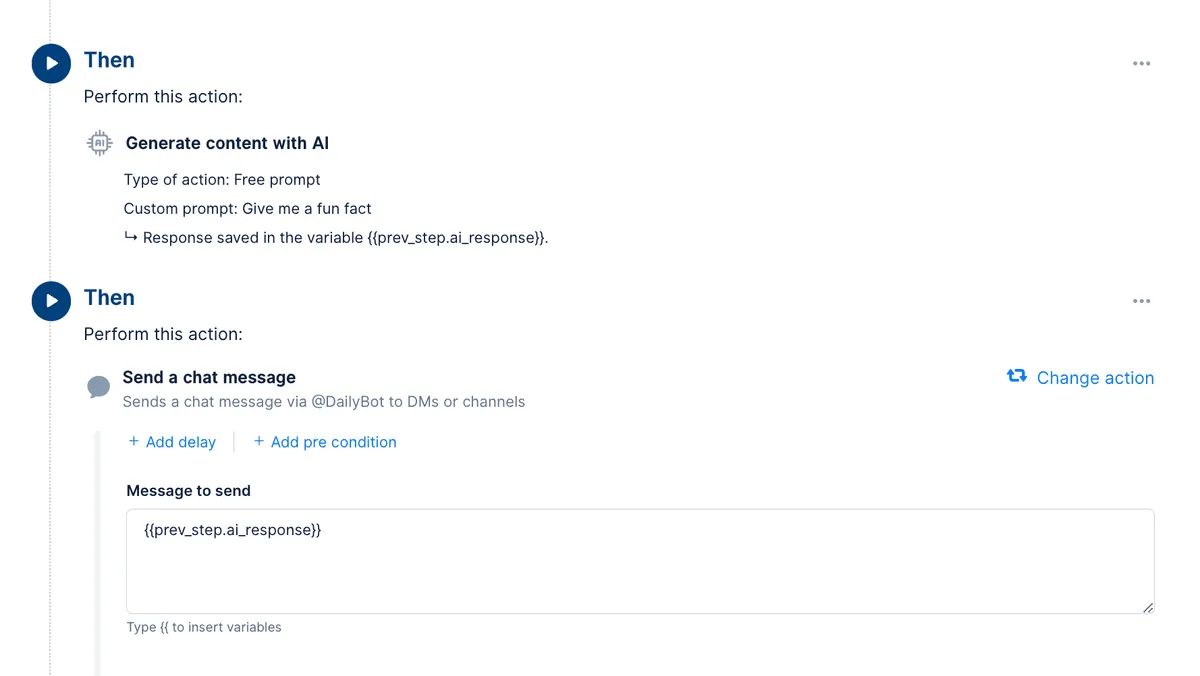
- Free prompt lets you write your own instruction and inject variables from previous steps
- Sentiment or tone helpers highlight mood or risk language when enabled for your org
- Classification style tasks bucket feedback into labels you define for routing
- Draft generators produce emails, chat messages, social posts, or ad copy from structured inputs
Use summarization when people already wrote the truth and you need a leader friendly view. Use free prompt when you have a repeatable template but unique context each time. Use classification when triage volume is high and you need consistent routing tags.
Pick one job per step. Chaining three tiny steps beats one giant prompt that tries to summarize, classify, and draft at once. Smaller steps are easier to debug when something sounds off.
Variables and posting to chat
When an AI step finishes, its output is available to later steps as a variable. If you want Dailybot to speak the result in chat, add a Send a chat message step and insert the variable for the previous AI response. The exact placeholder format matches what your workflow editor shows, similar to {{prev_step.ai_response}} patterns.

Always preview. Models can hallucinate contact names, deadlines, or policies. A human should scan anything customer facing, especially if the workflow runs on a schedule where nobody is watching live.
Set up your first AI workflow
Start with low risk traffic. An internal recap channel or a manager only DM is better than a public customer community for v1.
Follow this sequence:
- Pick a trigger you already trust, such as a completed check-in or a form submission with clear fields.
- Add one AI step that summarizes or drafts from those fields. Keep the prompt specific about tone, length, and what to omit.
- Add a delivery step that sends the draft to a private test space. Include a link back to the source response for verification.
- Run five real examples with teammates who will give honest feedback. Adjust the prompt based on what feels robotic or wrong.
- Widen visibility only after two consecutive weeks without bad surprises.
Document who owns prompt updates. Models drift as your product language changes, so assign a person to refresh instructions when marketing or legal renames features.
Governance habits that matter
Log what each AI step is allowed to see. Avoid sending secrets, keys, or personal data you would not put in a shared doc. If a step generates external content, add a manual approval gate until you trust the template.
When something fails, save the inputs and outputs. That record makes it easier to tighten prompts or add guardrails without guessing.
Dailybot workflows let you mix deterministic automation with model assisted steps so you get speed where it helps and control where it matters. Build small, test honestly, and treat AI output as a draft your team still owns. That is how automation stays trustworthy as you scale.
FAQ
- What is an AI workflow in Dailybot?
- It is a workflow where at least one step calls a model to generate or transform text using prompts and variables from earlier steps, such as summarizing a check-in or drafting a chat message from a form response.
- How is that different from a regular workflow?
- Regular workflows move data and send messages on fixed rules. AI workflows add a generation or analysis step that interprets free text, which means you review outputs more carefully and often add a human approval step before anything goes public.
- How do I post AI output to a channel?
- After an AI step runs, add a Send a chat message step and reference the prior step’s AI response variable so Dailybot posts the generated text. Test in a private channel first so formatting and tone match what you want.