How Dailybot uses AI to improve your workflows
You will get a practical overview of Dailybot’s AI assistant, smart summaries, blocker signals, and workflow suggestions, plus what the system can do well and where you should still rely on human judgment.
Artificial intelligence is most useful when it removes repetitive reading and writing, not when it tries to replace your judgment. Dailybot embeds AI where your team already reports status, asks questions, and runs automations. That placement matters because you get help without opening yet another tool or copying context by hand.
This article explains what the AI features are for, how they behave at a high level, and how to work with them responsibly. For deeper topics, follow the articles on AI workflows, smart summaries, and blocker detection after you finish here.
Smart summaries and context understanding
Check-ins produce a lot of text. Leaders rarely have time to read every line on a busy Monday. Smart summaries compress many answers into a short narrative that highlights themes, mood signals, and dependencies. The model is not guessing from a single keyword. It weighs multiple responses together so recurring issues stand out from one off complaints.
Context understanding also means Dailybot can relate how different people describe the same bottleneck. One person might say they are waiting on design. Another might mention Figma access. A third might flag approvals. The system groups those ideas when the pattern is strong enough so managers see the dependency instead of three unrelated sentences.
Blocker detection and follow ups
Blockers rarely arrive with a label. They show up as hesitant standup answers or vague “waiting on” lines. Dailybot’s intelligence layer looks for that language in the responses your team already submits. When signals repeat or escalate, the product can route alerts, create reminders, or queue follow up questions according to rules your admin sets.
Detection is probabilistic. A frustrated sentence is not always a blocker, and a polite message can still hide a risk. Treat alerts as triage helpers. Confirm with the person, adjust ownership, and close the loop in your own words.
Workflow suggestions and AI powered actions
Beyond chat, Dailybot workflows can include steps that call models to summarize a form, classify feedback, analyze sentiment, or draft a message from prior step output. That is how you turn a routine intake into something actionable without asking humans to paste the same prompt into a separate AI tab every day.
If you are new to that pattern, read Building AI-powered workflows next. It walks through how steps chain together and how to post AI output back to a channel safely.

How to work with the in chat assistant
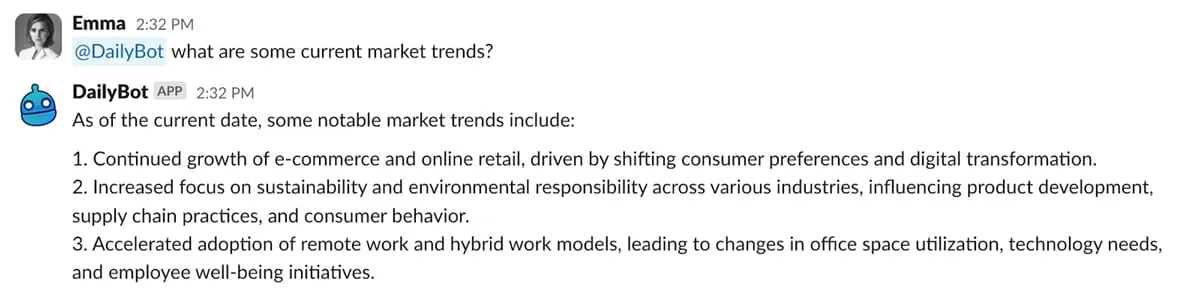
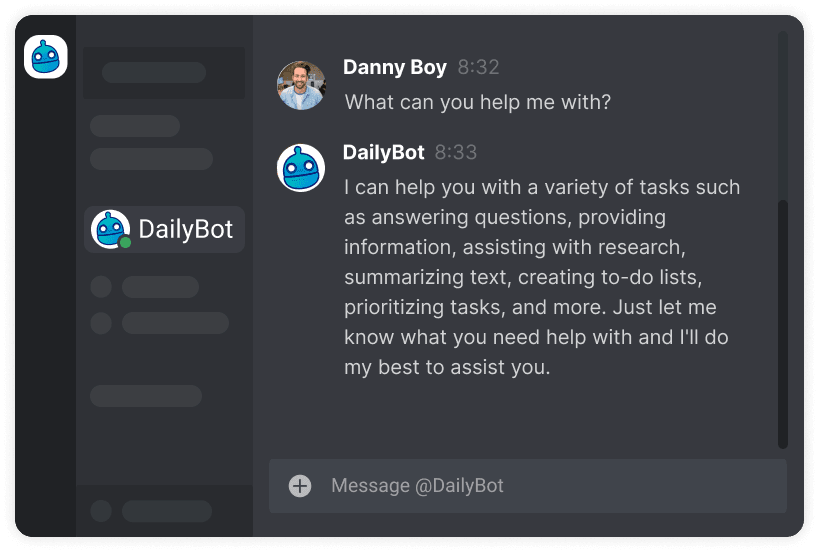
You can start a conversation by mentioning @Dailybot or messaging it directly. When AI is enabled, general questions are interpreted as requests for help rather than commands, as long as you are not triggering a named Dailybot flow.
If answers drift off topic, add the clockwise arrows emoji 🔁 before your next message to reset context, per your workspace guidance. Short, specific questions work better than huge paragraphs. If you need a precise fact from your own systems, remember the assistant only knows what Dailybot and connected integrations expose.
The following habits improve results:
- Ask one clear question so the model knows what “done” looks like
- Include constraints like audience, tone, or length when you want a draft
- Verify before you ship anything customer facing or contractual
What the AI can and cannot promise
Dailybot’s AI can speed up reading, drafting, and routing. It can suggest next steps from patterns in team data. It can reduce the copy paste tax between check-ins, chat, and email.
It cannot guarantee truth. It should not be treated as legal, medical, or financial advice. It should not override your security policies or access controls. It will not invent permissions to see data your workspace has not connected.
Privacy expectations matter. Your organization’s settings and agreements define how data is processed. If you are unsure what is allowed to send to a model, ask your admin before you paste sensitive material.
Fit with the rest of the product
AI in Dailybot is additive. Check-ins, forms, kudos, and workflows still work the way you expect. The intelligence layer simply helps you get more value from the signals you already collect instead of letting them sit unread.
When you use these features with clear norms, teams spend less time summarizing and more time deciding. That is the practical promise: faster clarity, earlier detection, and fewer manual steps between a status update and a useful action. Turn the features on thoughtfully, teach people how to verify outputs, and you will feel the difference in your first intense sprint.
FAQ
- What can Dailybot’s AI do in everyday work?
- It can answer natural language questions in chat, draft or summarize text, highlight themes in check-ins, surface likely blockers, and power workflow steps that generate content from your team’s inputs, all within the permissions your workspace configures.
- How do I talk to the AI assistant?
- Mention @Dailybot in a channel or open a direct message, then ask a question in plain language. If your org enabled AI, Dailybot treats general questions as AI requests rather than commands, unless you are triggering a defined check-in, form, or slash flow.
- What should I not expect the AI to do?
- It is not a source of private data outside what your workspace already shares with Dailybot, it is not a replacement for policy or legal review, and it can be wrong or overly confident. Always verify anything that affects customers, security, or compliance.