Connecting external APIs through commands
Learn how to create Dailybot commands that call external APIs, configure requests, handle responses, and integrate third-party tools from chat.
API request commands let you connect Dailybot to any external service that exposes an HTTP endpoint. When someone runs the command, Dailybot makes a request to the URL you’ve configured and can display the response, trigger an action, or pass data along to a workflow. This turns your chat platform into a lightweight integration layer where team members can query systems, trigger deployments, or pull status updates without switching tools.
When to use API commands
API commands are the right choice whenever you want to interact with an external system from chat. Common examples include checking the status of a service or deployment pipeline, creating tickets or issues in project management tools, querying a database or internal dashboard for metrics, triggering builds or CI/CD pipelines, and posting data to a webhook endpoint.
If the action you need is a single HTTP request with a predictable response, an API command is probably the simplest path. For more complex sequences that involve multiple steps or conditional logic, consider pairing the command with a workflow or using a custom code command instead.
Creating an API request command
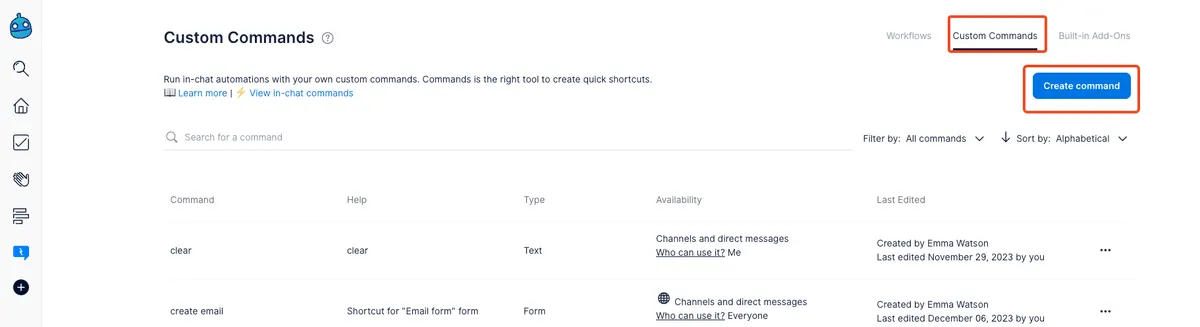
Open the Dailybot web app, go to Custom Commands, and click Create command. Select Make a request to an API as the command type.
You’ll see fields for configuring the request. Start with the URL, which is the endpoint you want to call. Then select the HTTP method that matches the action you’re performing.
Dailybot supports the following HTTP methods:
- GET for retrieving data
- POST for creating resources or sending data
- PUT and PATCH for updating resources
- DELETE for removing resources
- HEAD, TRACE, OPTIONS, and CONNECT for specialized use cases
Headers and authentication
If the API requires authentication, you can add custom headers in the request configuration. A common pattern is to include an Authorization header with a bearer token or API key. You can also add content-type headers, custom identifiers, or any other headers the target API expects.
Keep security in mind when configuring headers. Avoid hardcoding sensitive tokens if multiple people have admin access to your Dailybot organization. If possible, use tokens with limited scope and rotate them periodically.
Request body
For POST, PUT, and PATCH requests, you can define a JSON body that gets sent with the request. This is where you include the data the API needs to process, such as ticket details, notification content, or configuration parameters. Make sure the body structure matches what the target API expects, and test with a simple payload before adding complexity.
Displaying the response
By default, the raw API response isn’t automatically posted to chat. To show the response to the user who ran the command, you have two options. The first is to create a workflow that triggers on “User runs a command” and includes a “Send a chat message” action that references the response data. The second is to use a custom code command instead, which gives you full control over how the response is formatted and returned.
For simple use cases where you just need confirmation that the request was sent successfully, the default behavior works fine. The user sees that the command ran, and the API handles the rest in the background.
Example integrations
A DevOps team might create a /deploy-status command that sends a GET request to their CI/CD tool’s API and returns the current pipeline status. A support team could use a /create-ticket command that POSTs to their ticketing system with details from the chat conversation. A marketing team might set up a /campaign-stats command that queries an analytics API and returns key metrics.
The pattern is consistent across all of these: identify an API endpoint, configure the request, and give your team a one-word shortcut to trigger it. The time savings compound as more people on the team adopt the commands.
Tips for reliable API commands
Test your command with a known-good endpoint before sharing it with the team. Verify that the response code and body match your expectations, and handle error cases gracefully by providing clear messages when something goes wrong. Monitor your API’s rate limits, since a popular command used by many team members could generate more traffic than you anticipate.
Dailybot’s API commands turn your chat into a bridge between your team and the tools they depend on. By removing the need to switch contexts, you make external integrations accessible to everyone, not just the people who know how to use each tool’s interface.
FAQ
- What HTTP methods does Dailybot support for API commands?
- GET, POST, PUT, PATCH, DELETE, HEAD, TRACE, OPTIONS, and CONNECT.
- How do I display an API response in chat?
- You can pair the API command with a workflow that posts a chat message after the command runs, or use custom code commands to format and return the response directly.
- Can I include authentication headers in API requests?
- Yes. You can add custom headers, including Authorization headers with tokens or API keys, in the request configuration when creating the command.