Triggering forms from chat commands
Learn how to create a command that opens a Dailybot form on demand, with practical use cases and setup steps.
Sometimes you want a fast way to launch a form from chat without asking people to remember the form’s built-in shortcut or navigate to the web app. Dailybot lets you create a command that opens a specific form the moment someone types it. This gives your team a single, memorable keyword to start any data collection process, from incident reports to feedback surveys to ad-hoc requests.
Why connect commands to forms
Forms are powerful on their own, but pairing them with a dedicated command makes them even more accessible. A command is a chat-native action: people type a word, and something happens. By linking a command to a form, you remove the extra step of finding and remembering the form’s own shortcut. This is especially useful in organizations with many forms, where team members might not know which shortcut belongs to which process.
Another benefit is consistency. You can standardize how your team initiates key processes. Instead of having some people type the form shortcut, others search in the web app, and still others ask a colleague, everyone uses the same command. That uniformity makes onboarding easier and reduces the chance of someone skipping a step because they couldn’t find the right form.
How to set up a form trigger command
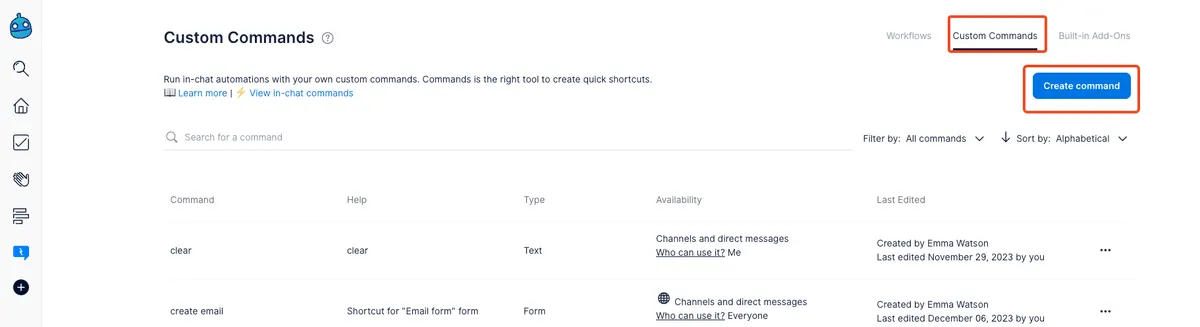
Creating a form trigger command follows the same flow as any other command type. Open the Dailybot web app, go to Custom Commands, and click Create command.
Select Trigger a Form from the command type dropdown. A second dropdown appears showing all the forms available in your organization. Pick the form you want to link, then give the command a descriptive name. Good names reflect the process the form supports: /incident-report, /feedback, /access-request, or /pto.
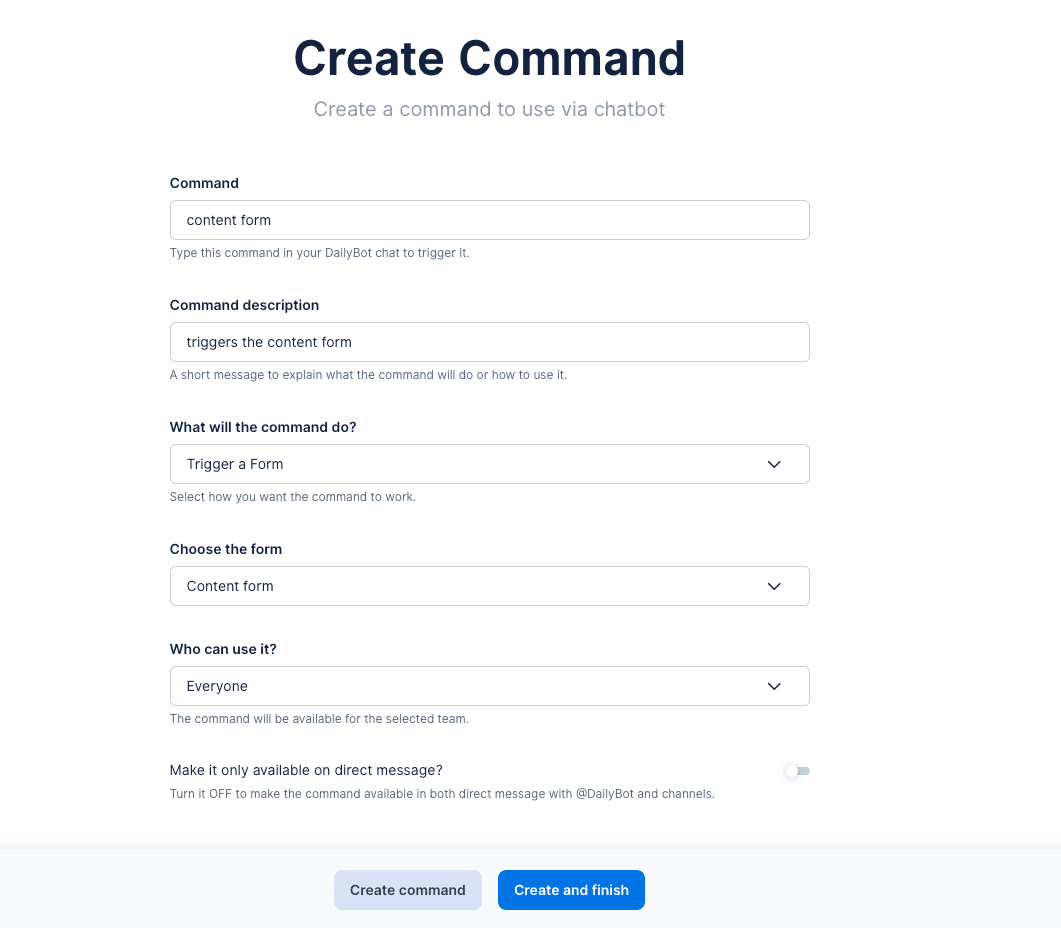
Add an optional description so other admins understand the command’s purpose, then click Create and finish. The command is now live, and anyone who types it in a DM with Dailybot will see the linked form start immediately.
What the user experiences
When someone runs a form trigger command, the experience is identical to triggering the form directly. Dailybot greets them with the form’s intro message (if one is configured), then presents questions one at a time in chat or offers the option to complete the form on the web. After the last question, the responses are saved and, if a response channel is set up, a summary is posted for the team.
From the respondent’s perspective, the command is just a shortcut. They don’t need to know whether they’re running a command or triggering a form directly. The result is the same, and the experience is seamless.
Practical use cases
Incident reporting is one of the most common uses for form trigger commands. When something goes wrong, the last thing you want is for the reporter to spend time searching for the right form. A simple /incident command puts the form in front of them immediately, which means faster reporting and more complete data while the details are still fresh.
Feedback collection is another strong fit. After a meeting, workshop, or product demo, a facilitator can drop a command like /feedback in the channel and everyone can fill out the form without leaving the conversation. This captures input while it’s top of mind, which typically leads to higher response rates and better quality feedback.
Ad-hoc requests, like equipment orders, access provisioning, or room bookings, also work well. These are processes that happen irregularly and benefit from structured input, but nobody wants to memorize a form URL they use twice a year. A command solves that by being easy to discover and easy to type.
Tips for managing form trigger commands
Keep your command names consistent with other commands in your organization. If all your commands follow a pattern (like verb-noun), your form trigger commands should too. Review your commands periodically to make sure they still point to active forms. If you retire or replace a form, update or delete the associated command so people don’t hit a dead end.
You can also create multiple commands that point to the same form. This is handy when different teams prefer different terminology for the same process. The engineering team might use /bug-report while the QA team uses /defect, and both open the same underlying form.
Connecting commands to forms in Dailybot removes barriers between your team and the processes they need to follow. One keyword, one action, and the right form opens instantly, keeping data collection fast and friction-free.
FAQ
- What does a form trigger command do?
- It creates a chat shortcut that opens a specific Dailybot form when someone types the command. The user is then guided through the form questions in chat or on the web.
- How do I create a command that triggers a form?
- Go to Custom Commands, click Create command, select Trigger a Form as the command type, choose the form you want to link, name the command, and save.
- Can one form be triggered by multiple commands?
- Yes. You can create several commands that all point to the same form, which is useful if different teams prefer different command names for the same process.